

So I finally decided to bite the bullet and replace my aging Athlon XP 2200 socket A HTPC. It could barely handle any high definition content like mpeg2 TS files recorded with the hdhomerun.
I'll be building another machine very similar to this one to replace my aging server and development pc's (which are of similar ancient low end specs). Later when the new affordable 45nm q9450 cpu's come out I might be building a 3rd machine as my gamer. I'll have to look at my budget as all this pc building is getting very expensive.
The HTPC is part of a larger home wide pvr recording and playback system I've been developing over the past 3 yrs. It's called rcTV and is written entirely in c# utilizing xmltv for guild data, very powerful scheduling engine (season passes and more), supports multiple tv capture cards, hdhomerun, multiple recording machines, multiple playback clients, hauppauge mediamvp, channel changing through serial/firewire for cable STB to capture premium content but only in SD over svideo using video input on pvr-250, girder, usbuirt, mp3, jpeg slide show (including avi movies taken with a canon digital camera), etc. Playback utilizes both managed directx for directshow filter engine playback and also libvlc for VLC engine playback so codec support is very broad. I work on it in my spare time so someday I plan to release it if I ever finish it though it's very functional right now but a bear to install.
Currently I run three pvr-250 for analog cable capture and hdhr for clear qam HD capture. I just ordered another hdhr so that will let me record 4 hd streams simultaneously. The capture devices are spread out across 3 different machines but they all feed off a single centralized schedule/season pass list. I have 2 HDTV's and 2 SD tv's each with a pc hooked up to it to run rcTV client for playing back content. MediaMVP is also supported as an option which I have 3 of them. Each client pc can playback any media stored anywhere in the home network. It doesn't matter where or what machine it was recorded on. You get one nice consolidated list. It always resumes where you left off even between different clients b/c bookmark data is stored back in a single centralized xml file. Actually when I started this project I forced myself to do it all in XML instead of a more traditional database to force myself to learn xml and xpath better. It's nice in that everything is easy to edit and install but concurrency issues had to be worked out (yeah try dealing with FILE level locking HA!). Currently I've allocated about 2.3TB of space to rcTV with about 1.5TB used right now (over 700 shows but yeah we watch only a small percentage of that. We like having choices.). With the new server I'll be adding another 2TB of space.
So that's just a little background how this htpc is getting used and how it fits in with the rest of the network.
I chose a rather large case for an htpc but I have a unique situation where the pc is located behind the side of my couch against a wall which hides it pretty well.
You can see how it is situated from this older pic (this still has my old pc in the shot but the new pc is in the exact same spot)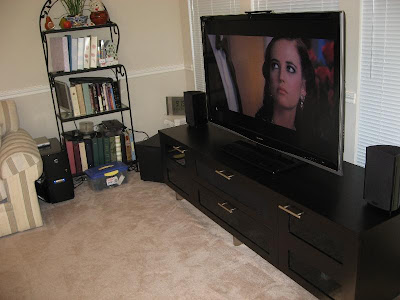
Hardware Parts List :
(prices include tax and shipping where applicable)
$25 cooler master cm690 case; microcenter
$216 Intel Core 2 Quad Q6600 Kentsfield 2.4GHz 2 x 4MB L2 Cache LGA 775 Processor - Retail; microcenter
$132 GIGABYTE GA-EP35-DS3R LGA 775 Intel P35 ATX Dynamic Energy Saver Ultra Durable II Intel Motherboard - Retail should see 3.5gb of ram in 32bit os
$90 G.SKILL 4GB(2 x 2GB) 240-Pin DDR2 SDRAM DDR2 800 (PC2 6400) Dual Channel Kit Desktop Memory - Retail
$114 WD 500GB 7,200RPM SATA-300 Hard Drive (WD5000KSRTL) ; microcenter
$27 NEC Black 1.44MB 3.5" External USB Floppy Drive Model UF0002S-102 - OEM Just need one to have around just in case.
$13 SUPER TALENT INT-AIN1-C All-in-one USB 2.0 Card Reader - Retail SDHC support
$30 SAMSUNG Black 20X DVD+R 8X DVD+RW 16X DVD+R DL 20X DVD-R 6X DVD-RW 12X DVD-RAM 16X DVD-ROM 48X CD-R 32X CD-RW 48X CD-ROM 2MB Cache SATA 20X DVD±R DVD Burner with LightScribe - OEM
$35 Antec earthwatts EA500 ATX12V v2.0 500W Power Supply 100 - 240 V UL, CUL, FCC, TUV, CE, CB, C-tick, CCC - Retail
$0 XFX 8600GTS XXX already had this sitting in the closet
$52 ZALMAN 9500A 92mm 2 Ball CPU Cooler - Retail
$36 Enermax Marathon 120mm Fan - Magnetic Bearing X 4 @ about $9 each
$770 TOTAL
Additional hardware migrated from the old htpc:
- hauppauge pvr-250
- 1394 firewire card
- usbuirt
- xbox 360 external hd-dvd drive
- hooked up through DVI->HDMI to my Sharp 52d64u 52" LCD HDTV
- audio is through spdif coax to my onkyo sr-705 receiver.
- 300gb seagate, 250gb maxtor (both are on ide -> sata adapters)
drivers (vista 32bit):
- I pretty much ignored the included disk and went straight to Gigabyte's site.
- For audio I first installed the latest gigabyte provided drivers then I went to realtek directly and saw they had a newer release (R1.87a vs R1.80). First time you run setup it will uninstall the existing driver, reboot, run setup again and it will install R1.87a.
- pvr-250 (WinTV2000 Hybrid Full CD 4.1.26009). The only thing I used from this was the drivers. I didn't install any of the software or codecs.
- cable STB channel changing through firewire (firestb-vistarc1.msi). Check only firewire command line apps and firewire drivers. All we want out of this package is the command line firewire channel changing.
- usbuirt for use with girder and my harmony remote.
- samsung optical drive bios. It came shipped with the latest ver sb01.
Codecs (more on this later):
- ffdshow tryouts (I used latest nightly cslid build)
- ac3filter
- vsfilter (subs)
- Haali Media Splitter
- powerdvd 7.3 (v3319a)
This is the last version that allowed you to open from hard drive mode. If you do patch to the latest version is to rip everything as ISO and mount with daemon tools and then open from the virtual drive letter.
Motherboard

- Great value. It's a really nice mb for the price. I really like the dual bios and qflash features. 8 sata ports. Very high quality caps. Passively cooled, no fans!
- Layout could be a bit better. The 4 pin ATX12V connector could be more conveniently located. If you mount your psu at the bottom it could be a bit of a stretch to reach all the way to the top of the mb and around your heatsink. I wish it had 1394. Also, it would have been nice if they included brackets for spdif in, serial, and parallel. All the headers are there; just no cables or brackets.
- Came with F1 bios (supposedly will post with wolfdale). Used qflash to flash to F2 (I'm skipping on F3 until it's out of beta) using a usb memory key drive. I'm not sure you need to do this but I first went into the bios setup screen then hit the key to go to qflash and my usb memory was detected just fine. I didn't seem to work if I went from a cold boot directly to qflash. I didn't really play with it enough confirm this though. Zalman 9500a installed just fine. Just make sure you plug in the atx12v power before mounting the motherboard into the case. I had no problems plugging in the 4 pin 12v power connector even after installing the zalman. The retention clip does end up blocking the first memory slot but I just use slots 2 and 4 which are fine (I don't see my self going from 4gb -> 8gb any time soon). I guess you might be able to flip the clip 180 degrees but then it was hitting some of the caps. You could also just flip the entire heatsink/retention bracket 90 degrees and have it exhausting up. Anyways, I'm sure there is a way to mount the zalman if you really want access to all 4 memory slots.
UPDATE: I re-mounted the heat sink. I flipped it 180 degrees so now none of the memory slots are blocked. See toward the end of the post for details.
- used the line method of applying arctic silver 5.


The Build:
- Ran the latest memtest86+ passing all tests just fine.
- Of course I put my hdd light connector backwards the first time (this always happens). Insert the cable with the text facing down.
- Installed vista 32bit ultimate, security updates, latest chipset drivers, network, sata (gigabyte), audio, then video drivers in that order.
- Vista installed just fine even with all 4gb installed. 3.5gb shows available.
- Stick with installing windows with bios optimized defaults.
I made the mistake of changing the onboard sata/ide ctrl mode from the default of IDE to AHCI(to enable NCQ) which caused vista install to hang. Just leave at IDE until after the install. Then, you can flip it to AHCI.
- Removing the jumper on the seagate 1TB drive is a pain. You need to take it off to enable 300 (otherwise it limits it to 150 mode).
- The cm 690 case has been the best case I've ever worked with (and amazing at $20). I need to find me another one of these. Even at the regular $80 at fry's it's not a bad deal for what you get. I've got 7 X 120mm fans in there and it's really pretty quiet!
All the tool-less features actually work and hold everything nice and tight in place (unlike my thermaltake case where the clips for the expansion cards were worthless).
- Optionally you can add an 80mmX15mm fan on the back of the motherboard tray. Tracking down thin fans is rather difficult.
I ordered the Delta EFB0812LB 80x15mm Low Speed but it's way loud. Silly me I got the 4pin connector instead of the 3pin version. Just get the 3 pin version and slap a zalman fanmate2 on there to quiet the sucker. I couldn't quite figure out how to mount the thing so just removed the bracket that was there and zip tied it to two protruding posts.
- This is also the first machine I'm building without a floppy drive. Instead I picked up a usb floppy drive for those rare times I do need to read a floppy. I put in a multi card reader into the 3.5" bay. I had to flip the 3.5" bracket 180 and then mount with the reader sticking the furthest out using only 2 screws but it did fit nice and flush with the front of the case after that.
Vista hates sound!
- Yeah since vista basically completely rewrote the entire audio subsystem throwing out directSound hardware acceleration it's caused nothing but trouble. I could not get VLC to play back 5.1 through spdif. Even switching to win32 wav out didn't help. The sound would cut out every few seconds. It worked fine when it was only 2 channel audio but as soon as you tried to play 5.1 it would cut out. I tried optical vs coax, realtek R1.80, R1.87a, and even rolled back to the base vista audio drivers when it was first installed. I even tried this dirty method.
Nothing worked. I hear it works fine in xp, and that this is a vista specific issue.
- Finally I gave up and decided to go the directshow filters method. I installed in this order: powerdvd 7.3 (for hd-dvd/blu-ray playback), ac3filter (spdif pass through for ac3/dts),
Haali Media Splitter, vsfilter (regsvr32), configured haali to decode subtitles (I like having subtitles on), ffdshow allowed with all apps but disabling any of the ac3 audio related stuff since I wanted ac3filter to handle that. Now I'm not sure if I needed all of that since ffdshow handles a lot of that stuff. At minimum I probably needed ac3filter and ffdshow. Anyways I could play pretty much any media I threw at it including mpeg2(ts with ac3 5.1), mkv with x.264 with dts and subs, even sd mpeg2 program stream with Closed Caption. It pretty much let me play everything great including subtitles. ffdshow is highly configurable (video and audio) letting you turn on/off many features like deinterlacing, etc. I didn't even have to mess with filmerit. ffdshow handled it all. I confirmed the rendering path with gspot that ffdshow was being used to decode video
- On really high bit rate high resolution mkv x.264 files I noticed some slight pauses. This also happened in VLC. I noticed it wasn't threading very well and one of the cores was getting hammered pretty hard. After I OC to 2.88ghz everything ran perfectly smooth. So I guess I'm sticking to 2.88ghz. This isn't an issue with something like powerdvd which uses nvidia purevideo and offloads a ton of the processing to the gpu. A 1080p 25mbps vc1 hd-dvd plays back at less than 10% cpu utilization across all 4 cores even at stock 2.4ghz. I don't think vlc or the codecs used in ffdshow offload much to the gpu or even multi thread well. UPDATE: uninstalled ffdshow beta 4 and went with the latest nightly clsid build. CPU utilization almost dropped in half down to 22-40% and much more evenly spread among the 4 cores.
Overclocking and Benchmarks:
- q6600 g0 stepping
- This was the easiest over clock ever! Just upped the clock to 333 (or 334), X9, memory 2.5 (so memory is slightly overclocked to 832mhz), memory timing - 5 5 5 15 2T, everything else at defaults including all voltages.
Orthos X 2 setting processor affinity so all 4 cores are maxed out. 8hrs + stable. Temps top out at 65c. occt 30min test temps: 60 55 55 57.
Default VID on this chip is 1.2125.
Compared to others I think I got one of the lower ones.
- I decided to back down just a tad to 320X9 (2.88ghz) with memory at 2.5 it runs at stock speed of 800. I then cranked the cpu fan down a bit to reduce noise. Idle at 47c and typical use load (though not orthos maxed load) stays under 60c.
- I like how intel speestep kicks in when the cpu is idle dynamically dropping the multiplier down to 6X from 9X.


- This is not a gaming pc so the 8600gts works just fine especially for video decoding.

- for a short while I had the evga 8800gt KO in there and ran a few quick benches:
3dmark 2001se 41357
3dmark 06
13220
sm2.0 5618
hdr/sm3 5415
cpu 4282
46.2, 47.3, 51.6,56.6
1.404, 2.090
Vista Tips:
- A nice collection of tips.
- auto login
- remove shortcut text (run regedit as admin, import both machine and user regs, reboot):
- Windows RE (vista recovery console equivalent):
- Run apps at startup with elevated privileges.
- Permanently show command prompt here
- Save and Restore Desktop Icon Layout in Windows Vista (xp too)
Power Usage:
- My old htpc ran at around 121 watts idle using a killawatt measuring device. This new machine is 156 watts idle (speedstep kicks in and drops the multiplier down to 6X) and under typical load (watching a recorded HD mpeg2 TS file) it's about 185 watts. At around 10 cents per kw hr it would cost about $9-10 per month in electricity to run my old pc. The new machine is going to cost extra $3-4/month to run 24/7.
UPDATE: 3/6/08
So after building my new server using the arctic cooling freezer pro 7 I found my temps to be much better on that cheaper cooler that cost about $20 less than my fancy zalman. I did use the spread method of applying arctic silver 5 vs the recommended line method.
- first I rotated the plastic clip support frame 180. The lever slot no longer lines up with the socket lever but I don't care. It's not like I would ever remove the cpu without removing the motherboard first. I made sure the the arrow marked lug is where you push down and lock down last with your thumb. I cleaned up both the heat sink and cpu and reapplied AS5 using the spread method. The clip barely clears some items on the motherboard but having it flipped 180 it no longer blocks any of the memory slots. I've moved my memory to slots 1 and 3 now. I really hate the clip they use and it just doesn't feel tight enough (very floaty). I also noticed the zalman fan is 3 pin PWN so you can only adjust speed manually by the included fanmate2. You can't let the motherboard automatically do it for you.


oc to 2.88ghz. Zalman fan speed is tuned down to around 2000 rpm.
new idle core temp (dropped about 1-3c depending on the core):
under occt load (about 5c lower):
Still it's significantly worse than my server quad core which was oc to 3.0 ghz. So what does this mean?
1) the 2nd quad I got is just a better cpu even though its default VID is higher it just runs cooler
2) the zalman sucks and is basically a totally rip off. One expensive piece of crap.
3) maybe the zalman I got is slightly defective.
I'm leaning to #2.
I finally found a good disk benchmark that works properly under vista.
The free version only does read tests:
http://www.hdtune.com/
this one does read and write:
http://crystalmark.info/?lang=en
the new 500gb wd I got (drive c)
UPDATE: 3/16/08
A friend of mine built me this nifty PC Stand for use with my new htpc. Thanks!!!!


UPDATE: 12/12/08
- So I'm done with daemon tools for iso mounting. I've now switched over to Virtual CloneDrive.
- It's completely free and it doesn't try install anything extra like adware.
- does NOT use spdt.sys. Just google it to see why this is a GOOD thing.
- Perfectly happy with mounting images for network shares using unc paths. Deamon tools would blue screen (though you could map a drive first as a work around).
- Supports most of the popular image formats but not quite as many as daemon tools.
- Supports blu-ray and hd-dvd iso image formats.
- Pretty good command line support. Just run vcdmount.exe to see the options.
- With the latest power dvd 8 I had to update my audio drivers to v2.10 before spdif would work. Driver link is above in the original post.
- I've been steadily working on rcTV. I've recently updated it to support vlc 0.9.x playback, integrated media player classic home cinema playback (using their awesome http interface for tight integration between rcTV and the player), zoomplayer using tcp to control it, and powerdvd with auto mounting of .iso's using virtual clone drive. So I have 5 playback engines to choose from now: internal directshow (managed directx), vlc (ver .8 or .9 is supported), mpc hc, zp, and powerdvd. HD PVR is fully supported using rcTVCap for capturing HD content from cable STB. Popcorn hour (I have two now) is working nicely as an HD stand alone player instead of mediamvp (SD only) which I've since retired all of them. Video podcasts are downloaded by rcFeedMe into a directory that rcTV monitors and imports the shows so I can watch those using the same interface. The next big step is a ground up rewrite of the player piece in WPF. Maybe I'll go with a twist (zune) interface or something like xbox 360's NXE. Currently using 2.1TB of space out of 4TB with 993 shows.
Monday, March 03, 2008
HTPC - Intel Quad Core Q6600


Monday, February 25, 2008
Electroline FT08100 Drop Amp

http://www.cabletvamps.com/Products/EDA-FT08100.htm ($105)
note: the 8300 is out now that replaces the 8100:
http://www.cabletvamps.com/Products/EDA-FT08300.htm
I picked this up recently because my hdhomerun has been having some drop outs. I noticed signal strength was good (mid 90's) but quality was in the 80's and sometimes in the upper 70's.
I know the cable coming into the house is split 5 ways in the attic. I haven't been up there in a long time but I know a few years ago time warner added multiple splits up there so my cable modem got the first split. Anyways, I head up there and it's a MESS with 3 splitters!!!! Of course the room the HDHR is in is on the last split. So I remove all the splitters, the motorola signal booster, and put in this single drop amp. I attached 3 terminators to the ports I wasn't using. All my in house wiring is still rg-59. Back in the bedroom where the hdhr is, I've got it split 3 ways (monster splitter) without any additional amp. Signal strength and quality is now mid 90's for both hdhr tuners. The zero return is suppose to work great with bi-directional cable set top boxes and cable modems. I can't say much about the cable modem since I've gone DSL now. The STB's are still working fine. I might run two more dedicated rg-6 lines from the electroline just because I can (love having 8 coax outputs up there) and eliminate the 3 way split in front of the hdhr. I might just leave it as it is since it's working fine now. FYI, you need to supply your own coax cable to connect between the ac adapter and the drop amp.
I highly recommend this drop amp. It's a tad expensive but worth every penny!
Tuesday, February 19, 2008
Devil May Cry 4 (XBOX 360)

- Finished this last night. 13 hrs 17 min. I could have probably done it a lot faster but I spent some time exploring finding hidden items and secret missions. I also farmed a bunch of red orbs at the start of mission 7 to max out my blue and purple orbs.
- Having never really played a previous DMC game for more than a few hours I thought I would try Human level. It's a bit too easy if you ask me. I never died once and used health items like twice. If you can handle Ninja Gaiden then you probably should stick with Devil Hunter Mode.
- Major game padding, cheap lengthening issues. You fight all the bosses 3 times!!!! Granted they are some great boss characters but 3 times is a bit ridiculous. You backtrack the ENTIRE GAME, not a level or part of a level but the entire game. Sure you get a few new enemies and all the puzzles are already solved but it's basically the same thing all over again. Talk about major asset reuse.
- Graphics, art direction, and sound are all great. It's a really pretty game with a very fast and smooth frame rate. Voice acting isn't even that bad especially for Capcom.
- There are some really poor design decisions and almost requires you to have some previous knowledge of the earlier games. There are secret missions you can't complete your first time finding it or as a certain character. None of this is explained. That brings me to another point. There are a few poorly designed battles where it's just down right confusing on what you are suppose to do.
- Changing characters is quite jarring especially from a gameplay/control perspective.
- The story is quite confusing. I really don't understand the motivation for why some of the characters do what they do.
- Secret missions are really tough. I tried them all but only finished a few of them.
- The combat/gun play/combo/sytle system all works fine.
- Didn't really need to use Exceed all that much. Maybe it's more important on harder difficulty levels.
- No gamma slider adjuster!!!!! The game can be pretty dark at times.
- Finishing it unlocks some items like a history on DMC, art gallery, and a movie mode to watch all the cutscenes.
Overall I enjoyed it but it does have it's flaws. Recommended to 3rd person action fans. So far though I think Ninja Gaiden is better. I really looking forward to Ninja Gaiden 2 later this year.
Wednesday, February 06, 2008
The Elder Scrolls: Oblivion, Morrowind (piano)
This is from the sheet music made by Nightshade1. I make a few mistakes as usual. If you like the sheet music you should buy it from him here:
http://www.shademusicstudios.com/shop/shop.html
Portable Speakers
I picked up a few portable speakers. Both can be powered by batteries or the included AC Adapter. They are quite handy to use around the house or when you go camping.
left to right: Logitech mm28, Sansa e280, JBL On Tour
Logitech mm28 Portable Speaker


- Picked this up for a great price of $14 shipped from buy.com a while back when they were clearing them out.
- A little bit larger than the JBL but still very portable and light.
- I really like the design: the cover flips over to become the stand, the 1/8" mini audio jack stores nicely on the back. The cord is a tad short though.
- Powered by 4XAA batteries or the included AC adapter.
- Licensed flat panel speaker technology from NXT.
- Sounds great for the size. I thought mid and highs were nice and clear. There was a surprising amount of base considering the size. It does tend to distort at higher volume levels but still manages to produce a good amount of sound below that threshold.
- Just a single power switch. You control volume on the audio source device.
- Auto powers off if it doesn't detect any sound for a few minutes.
Overall it's an incredible value especially if you can find it at around this price.
Highly recommended!!!!
JBL On Tour Portable Speaker System


- Picked it up for $40 from amazon when it was on sale.
- Very stylish. I like the way it looks.
- Very small.
- It comes with a travel bag. The audio cord is separate. There's no nice place to store it. You just sort of wind it up and cram it into the bag.
- Slidding the cover up converts it into a stand. It's a bit odd how the speaker points more up than toward you. There are nice rubber grip feet on the back.
- Runs on 4XAAA batteries or the included AC adapter.
- Sound isn't too bad for the extremely small size. The highs are very clear. The mids aren't bad but there is hardly any bass. I thought the logitech sounded quite a bit better.
- Gets plenty loud before distorting for its size.
- Has power and volume buttons.
- Auto power off when you close the lid or when it doesn't sense any sound for a while.
- Resumes with your previous audio level.
- Power and audio inputs are a bit awkwardly located.
Overall it's not bad but I like the Logitech one better. If you really need ultra portable I guess this isn't bad but the Logitech is hands down the better value.


 English to Chinese BETA
 English to French
 English to German
 English to Italian
 English to Japanese BETA
 English to Korean BETA
 English to Russian BETA
  English to Spanish