I kind of collect doom games so it made sense that I immediately bought Doom on XBLA for 800pts ($10).
My Doom Collection:
Doom Movie DVD
Doom 3 Resurrection of Evil XBOX
Doom 3 Collector's Edition XBOX
Doom 3 Resurrection of Evil PC
Doom 3 PC
Doom Collector's Edition PC
Doom II PC
Master Levels for Doom II PC
Ultimate Doom PC
Final Doom PC
Doom GBA
Doom 3DO
Doom Saturn
Doom 64 N64
Doom Jaguar
Doom 32X
Doom SNES
Doom PSX
Final Doom PSX
- It's doom. It plays great on the X360. The new 5.1 sound is nice.
- Some nice achievements
- 4 player split screen, 4 player over xbox live, co-op too!
- Controls are fine but I couldn't figure out how to remap the controls. I wanted to move the action button to a bumper but oh well no big deal. It's not like doom had that many controls (no jumping, no crouching, no looking up or down).
- All 4 episodes included
- I thought I would just mess around with it for a bit but I'm suprised how much I'm enjoying playing this 15 year old game.
Highly recommended for any Doom Fan/Collector.
Friday, September 29, 2006
Doom (XBOX 360)


Wednesday, September 20, 2006
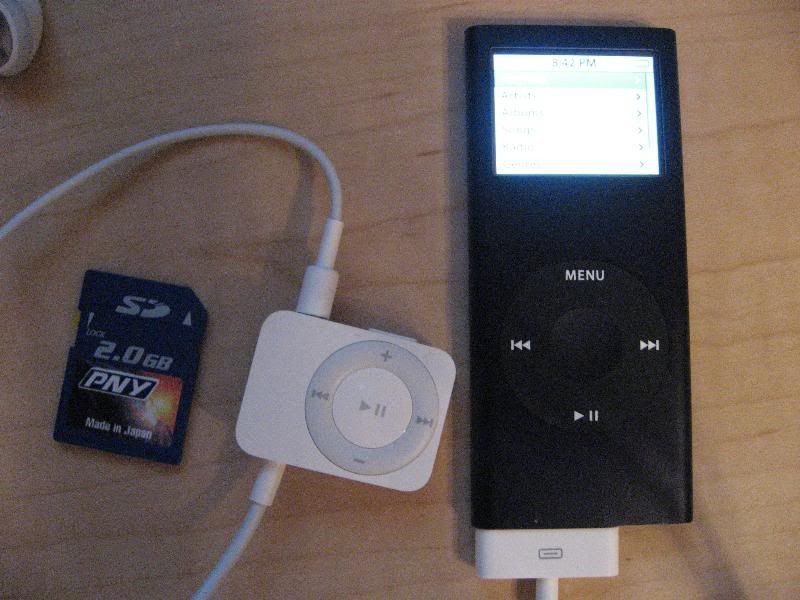
iPod Nano 8gb (2nd generation)
It has finally happened. We now own our first ipod.
I picked this up for the wife since her old iriver 128mb usb 1.1 mp3 player was just embarrassingly out of date. My practical nature in choosing electronics lead me to the nex3+ but was quickly rejected by the wife based on aesthetics.
good:
- thin, tiny, aesthetically pleasing
- nice bright color screen
- great battery life
- brushed aluminum so it's more durable and more scratch resistance. They also rounded the edges.
- pretty good value if you add up the cost of parts. Say a 4gb SD card runs $80-$100. So in just memory alone 8gb would run you close to $200. $50 for the player isn't that bad.
- the optional $50 FM module was smaller than I expected.
- displays photos pretty nicely even on that tiny screen. You can even create a little slide show with background music.
bad:
- 8gb (the only good value in the bunch) only comes in black.
- non user replaceable battery. This is my #1 issue with ipods. I'll either pay their exuberant prices and go through the hassle of shipping it to apple for a replacement or do some hack job myself in about 2 years when that battery only holds half its charge.
- no built in FM and $50 for a tuner is kind of nuts. Nanos are suppose to be used when working out. Most gym's broadcast the TV audio on FM!
- I can't handle the wheel. I keep overshooting the item I want by one. It seems a bit too sensitive to me.
- can only navigate music by id3 tag, no folder navigation
- photo slide show seems to sort the files in an unpredictable manner.
- limited resume functionality. No robust bookmarking.
- comes with a usb sync/charge cable. There is no cradle or ac adapter so you can't charge the nano while the computer is off. I think you can work around it by connecting it to a powered usb hub. But come on apple. For $250 I expect at least an ac adapter.
- have to use itunes to transfer music on to the nano. I really hate itunes especially the library. I hate being forced into id3 tag browsing vs folder. I added a music folder with a lot of mp3's. Yeah it hung...twice. I finally gave up and ended up dragging a few folders at a time into itunes. After an hour or so I finally got everything imported into the library and then quickly backed up the xml file just in case. Fyi, the mp3's are on a network share.
- Next I go and properly tag some files (outside of itunes) and then drag them back into the library. You would think it would update the tag info. NOPE! I had to play each song within the library before it would pull in the new tag information.
- It hung once while trying to flash the nano to 1.01 firmware. Ok granted I had it hooked up through a powered usb hub (read previous comment). So I rebooted, connected the nano directly, and it flashed just fine.
- no official movie support. Also, the new games on the itunes store are NOT supported on the nano.
Apple ipods are definitely targeted at a specific consumer which apparently covers 75% of the mp3 buying market which my wife is clearly a part of. I,on the other hand, am definitely part of that other 25%. The wife likes it and that's what is important even if it's a bit of a pain for me to support.
Recommended for those looking for something stylish, trendy, status symbol, simple, bought into the itunes store (why not just order the cd from amazon without any drm and rip it any way you want?), and those who love the wheel navigation.
NOT recommended for the power user looking for a ton of functionality, flexibility, and value.
Update: 9/21/06
- TheAngryIntern pointed out to me that the full version of winamp also supports transfering mp3's to the ipod.
- I noticed that the mp3's are just in a hidden directory with all the files and directories given cryptic names.
- I also found Anapod Explorer which seems interesting.
- Audio Books and bookmarking
Rio Forge 512mb MP3 Player
Here is another older review I did a while back. Rio is out of business now but these can still be found on ebay for cheap. Just make sure you avoid the "sport" models since those don't have the SD slot for expandable memory.
requirements: flash based, expandable memory, FM, resume
- about $170 shipped from newegg. I believe a $20 rebate has just started so you should be able to find a better deal now.
- solid state player with 512mb internal memory and a SD slot for expansion. Takes up to a 1 gig sd card though I'm thinking it's possible larger ones will be supported. Read/writes standard Fat32. No software needed. Just drag and drop with file explorer. When you plug it in you get two drive letters, one for the internal memory, and one for the sd card. This is very convenient. usb 2.0. I'm currently using it with a 512mb sd card for a total of 1 gig of storage.
- to remove the sd card you have to take out the battery first.
- flashed to latest 1.20 firmware. There are reports of faulty hardware if you get firmware version 1.01 out of the box. If you get 1.16 out of the box then you have the latest hardware revision. All 512mb versions are at least 1.16 because they didn't introduce the 512mb version until later. If you get the 128 or 256 then beware. I tried a 1.01 128mb version from best buy and the big problem is the fm reception is horrible so I returned it. I can confirm that the 512mb has much much better fm reception. You also gain the ability to record from fm (wav format).
- supports mp3, wma, and audible even.
- amazing resume/bookmark support. When turning the unit off or switching between mp3 and fm it ALWAYS remembers the exact track and second where you left off. I believe everything gets written to flash memory so I believe even with a dead batter it will remember where you left off. You have 10 independent bookmarks you can set. Saving a bookmark couldn't be easier. Hold down the middle button, a menu pops up letting you pick your bookmark(1-10) and save. This is the best implementation of resume/bookmark I've seen on any player. This is a critical feature for those who listen to audio books.
- claims of up to 20hrs on a single AAA battery. There is even a NIMH/alkaline setting so the battery indicator will be correct.
- 5 band equalizer. not just presets but a real equalizer.
- has a standard usb mini connector. the little plastic cover for the usb port is very easy to lose.
- comes with an arm band and a clip. You can bend the clip so everything fits very tightly. The headphones aren't too bad actually and wrap around your ear for a very good fit.
- good stop watch with lots of lap times
- tons of settings. You can configure many aspects of this player.
- volume and sound quality seem fine.
- when you first turn it on after changing songs it has to rebuild the database. This takes a while. After that boot time is about 4 sec.
- navigation: It has really good navigation based on id3 tags. You can choose by artist which will then drill down to albums. You can go straight to albums, genre, specific track, year, and new music (time based - when you added the songs). Every single level has a play all option, so you can play everything in memory, all albums of a specific artist, a specific album, etc.
- m3u play lists are supported. I've tried ones generated by audiograbber and ones from mp3tag. Just make sure you use relative paths.
- nice display and back light. Shows lots of information like codec and bitrate along with the usual mp3 tag info.
- no glitches or lock ups so far.
http://www.riovolution.com/
http://www.rioworld.org/
bottom line:
A great solid state player that's a tad over priced.

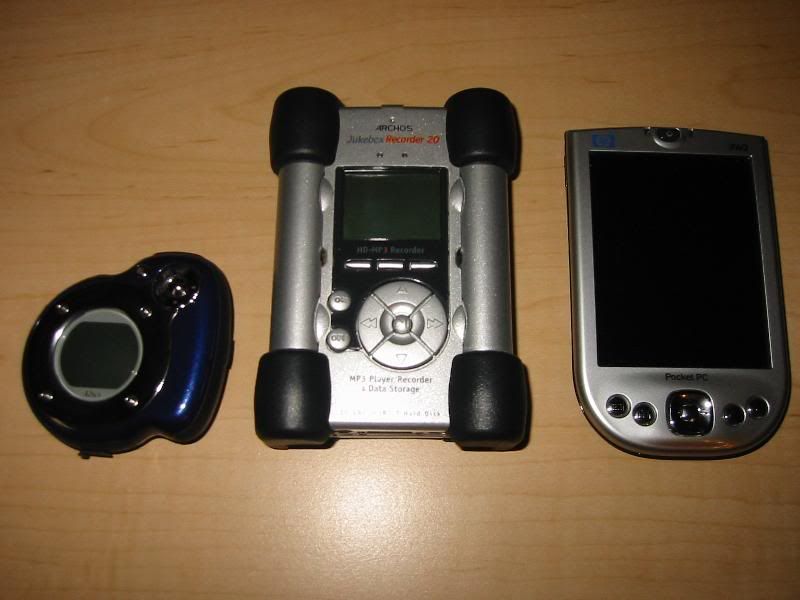
Archos Jukebox Recorder 20 MP3 Player
Here is an older review I did on my FAVORITE mp3 player:
lots more pictures:
http://www.dondario.de/archos/
There are some very clear advantages to this vintage mp3 player.
- about the size of a 2.5" laptop hard drive but 3x as thick.
- 20 gig hard drive based mp3 player
- discontinued for a couple of years now. you can still find them on ebay:
http://search.ebay.com/archos-jukebox-recorder-20
You should be able to get one for around $100 shipped for a working model if you are patient.
- uses 4 X AA standard nimh. With 2300mah I'm getting about 10-15 hrs (With a good mix of audio books and music I got close to 14hrs). A lot depends on the bit rate of what you are listening to. Higher bit rate means more hard drive access since shorter durations fit in the memory buffer.
- usb mass storage device. no special software needed
- usb 2.0
- requires a usb A(male)-A(male) cable (not the usual A-B). You can get these at fry's for $7-10 or you can buy a A->B adapter for about $4.
- uses a standard 2.5" laptop hard drive formatted to fat32. Pretty easy to upgrade. You want 100 gigs of music? You can do it with this player and for a lot cheaper.
- killer open source OS called rockbox:
http://www.rockbox.org
Without this there would be almost no reason to even consider this player. It has a ton of features for the power user. Read over the manual to get an idea of all it can do: full customization of almost every imaginable setting, directory navigation, unlimited bookmarks which are saved to the hard drive in a plain text file, resume, better usb support, better charging algorithm, games (even tetris), very flexible on the fly m3u playlist creation, and a ton more. No need to flash. Super easy installation. Just unzip to the root of the HD.
- lots of inputs/outputs. Digital in/out and analog line in. You can record directly to mp3 VBR up to avg 170 kbps. The quality is very good. Visual graph of recording level lets you adjust gain on the fly and also monitor/hear what you are recording on the headphones.
buying an archos:
http://www.rockbox.org/docs/devicechart.html
The only device that meets my criteria of using standard AA nimh, uses standard 2.5" laptop HD, and is usb 2.0 is the Archos Jukebox recorder 20. Only the 20 gig model are you guaranteed usb 2.0. The 15gb comes in both usb 1.1 and usb 2.0 so be careful.
I flashed my Archos with rockbox. This is completely optional. Archos runs just fine from the hard drive. Make sure you read carefully:
http://www.rockbox.org/twiki/bin/view/Main/FlashingRockbox
It was really easy and pretty safe. It took only a few minutes. I flashed with rombox so rockbox executes directly from flash instead of ram. I now have 1.761MB (up from 1.614) of free buffer memory (about 4% increase in play time - 30min).
The main reason I did it was I was getting tired of the 15 sec boot times. Now I'm enjoying 4 sec boot times!
Hard drive upgrade:
The drive should have the following specs...
2.5 inch
9.5 mm
EIDE
4200 rpm (I hear lower rpm helps battery life)
Fluid Dynamic Bearing (FDB) quieter.
I picked up this 80gb fujitsu laptop hard drive. It's currently only $104:
http://www.zipzoomfly.com
Installing it was quick and easy.
http://www.mctubster.com/hd.html
http://www.funmp3players.com/reviews/modify/
create a primary partition.
used h2format to format to fat 32
http://www.rockbox.org/twiki/bin/view/Main/UsefulTools
So basically for around $200 I have an 80gb mp3 player. If you ebay the original 20gb HD that came in the archos (for around $40) then you are looking at about $160 for an 80gb mp3 player! Sure it looks a bit dated, it's a bit larger and heavier but it uses so many industry standard parts (battery, storage) plus open source software. It makes it a dream to tinker with/upgrade for the power user. Overall I think it's a great value.
Tuesday, September 19, 2006
Dead Rising (XBOX 360)
- I just finished 72hr mode with the best "A" ending saving 23 people on my first run through. I'm level 39 now.
- This opened up overtime mode for another 24hrs of game time to get the real ending. (1:6 between real time:game time).
- Update: just finished overtime mode and got the true ending. I'm Level 40 now.
- I'll just say right off the bat that I really like this game but there are just some bone headed things it does that drives me crazy.
- Everybody has heard about the save system but It's not too horrible if you have at least one memory card and a X360 save transfer kit. I basically do all my risky saves to the HD. Once I get to a good safe point in the game, I save to the memory card and then immediately back it up to my PC. That way I can never blow my entire game and have to start over. Now, if you only have an HD then yeah you are basically SCREWED!
- AI path finding is just horrible. Ok, I understand that part of it is by design (the state of the survivor, injuries, etc) but come on. Before you get to the vent there is a ledge they have to climb up. I don't know how many times I'm sitting there running short on time and the two survivors are just sitting there running into each other, neither climbing, while I'm running around screaming "come on." It's like they get into a deadlock of who is going to climb first but since neither can stand in the exact climbing spot they just sit there running at each other and going nowhere. I was so frustrated I chained sawed two survivors right there on the spot. If they got rid of that one ledge and made it into a ramp it would have made a BIG difference.
- why isn't there a save point before the last boss fight?????
- The rest of the game is pretty awesome. The plot is just way out there but I love the characters (both the good guys and the psychos). I always look forward to the in engine cut scenes which are very graphically impressive.
Here are some tips. (WARNING some minor SPOILERS)
-Power level before you even start for around three hours. Try to at least get to the first speed level up (what gets leveled is kind of random). I would say around level 15 to 20 is good. I used Erik's great guide to power leveling.
- Kill adam the clown the first chance you get. He has THE best weapon in the game. Make sure you grab his two mini chainsaws. Triple book them and the two chainsaws will last you for the entire first 72hrs easily and makes killing bosses much MUCH easier. The chainsaws respawn if you ever need more. Each one can kill around 1200-1500 zombies before breaking.
- After case 2 things get a lot easier. But with the chainsaws and books even case 2 wasn't too tough. I had no problems finishing it on time.
- When you have some time to kill go get the maintenance tunnel key.
It will make the bomb section much easier. In fact I got 4/5 bombs from running around in the mall and going down with the key to get the bombs and then going right back up. The last one I drove to.
- Typically I carry 2 mini chainsaws, a ranged weapon (sub machine gun or nail gun), 3 books, and a few health items (wine or nectar from blending orange juice + orange juice).
- just run and jump kick the last boss over and over. Stand on the lower part of the tank. As the boss falls from the turret level down to your level jump kick him. Your forward momentum toward the higher turret level will make the boss think you are going up there (though you actually don't). That will make him climb back up. Just repeat several times to beat him.
interactive map
faqs
It says something that even though I really hate games with poor save systems I STILL highly recommend this game. It's just that good and different from anything you have played before.



 English to Chinese BETA
 English to French
 English to German
 English to Italian
 English to Japanese BETA
 English to Korean BETA
 English to Russian BETA
 English to Spanish