how to swap the hard drive:
http://www.gamersreports.com/article/43/
double your space to 120gb for around $100:
The actual manual shows you how to remove the hard drive and the controller battery:
http://www.joystiq.com/2006/11/11/ps3-manual-details-hdd-battery-replacement/
- A reason NOT to get the 20gb is no wifi and there is currently NO upgrade path. The wifi is REQUIRED for psp <-> ps3 interop since it does a direct wifi ad hoc like connection.
Very early impressions. LOTS more to come.
- bought two 60gb ps3's NO BUNDLE at best buy (I got one and the wife got one).
- Picked up Resistance fall of man, Ridge Racer 7, and an extra controller
- The thing is big and heavy (10 lbs).
- Picks up finger prints like mad.
- I like the slot loading blu ray drive
- The power and eject buttons are on a completely smooth surface and take a very light touch (no pressure really needed). Kind of a neat design aesthetic.
- I like the standard hdmi port on the back so you can pick up a cheap regular hdmi cable like from monoprice.com and use it.
- The 4 usb ports on the front are kind of hard to see and get to.
- 1 year manufacturer warranty (double that if you purchase with master card). vs the skimpy 90 days on the X360).
- I hooked it up to the TV using HDMI and optical for the sound. HDMI worked right out of the box. It detected my TV's max resolution of 720p and set it accordingly. There was no need to use composite cables first to enable hdmi or any silliness like that.
- I did have to enable DD5.1 and DTS5.1 for the optical in the settings menu before sound would work.
- Network setup was easy over wired (haven't tried wireless yet) using DHCP automatically.
- Came with firmware 1.1. I had to update to 1.11 before I could get online. It took a pretty long time (much longer than say an x360 dashboard update).
- XMB (cross media bar) interface is pretty much just like the PSP. I'm not a huge fan of XMB since I think it wastes a lot of space.
- Creating your Playstation@network account takes quite a few steps. Definitely grab a usb keyboard b/c the data entry is HORRIBLE. It's exactly the same as the psp which is basically a cell phone like text entry. OK, I understand why you do that with the psp because of the smaller screen but COME ON SONY GET A CLUE and give us a full virtual keyboard on the ps3 since it is hooked up to a big fancy HDTV with all that screen real estate. There's no excuse for this poor design decision.
- You get one mini usb cable in the box but you don't get another cable when you buy a second controller. Luckily I have a few spare mini usb cables.
- Charging the controllers only works when the PS3 is fully powered up. NOTHING gets charged when the ps3 is in stand by. STUPID!
- The manual does show you how to remove the proprietary lithium ion battery (takes a few screws). The manual also shows you how to swap out the hard drive.
- The system is very quite, much more quite than the x360. I stuck my hand in the back of the ps3 and it does get pretty warm.
- Web browsing is pretty darn slow. The control pad works well enough: left stick to move pointer, right stick to scroll the page. Text is very legible.
- Briefly tried the sony store. I bought blast factor (geometry wars like game) for $8 plus tax. I like how it in good old dollars and not a point system. I also downloaded motorstorm demo (about .5gb). There is NO batch or background downloading.
- The controller is light, and I really do miss the rumble feature. I really like the feedback it gave in fps when shooting a gun or collisions/going off track in racing games. The controller just feels dead and lifeless in your hands. I can see my hands getting tired holding down the trigger buttons. They don't seem to be designed very well. They are convex instead of concave(like a gun trigger). Hands down I like the x360 controller more.
- I also took the SD card from my canon sd700 camera and stuck it into the ps3. It would not play the movies (motion jpeg). On the other hand, the Wii played the movies just fine. Basically the ps3 only supports the same codecs as psp which means only mpeg4 for video. The photos played fine with the usual slideshow stuff. They had one interesting photo album mode where this parchment scrolled across as date/time data would appear and your photos looked like actual prints that floated down. Film negative strips would appear too, and you can zoom in and move around with the analog sticks. The negatives look like your actual pictures. All this is in 3D. It's an interesting tech demo but not that useful for actually viewing photos.
- I popped in Talladega Nights blu ray movie. It looked good but not any better than HD-DVD. Picture quality was pretty much the same for me. The player is pretty basic and doesn't even resume between power cycles. The xbox hd-dvd does resume.
- Doesn't seem like there is a way to stream media from a pc over the network.
- I played resistance fall of man for maybe 30min. It looks very nice with some good detailed models, hires textures, and nice lighting and particle effects. It does play like a more standard shooter similar to call of duty 2 or perfect dark zero than current more innovative shooters like gears of war or rainbow six las vegas. It's good but feels a bit old school at least in the first 30 min. I like it so far and I hear it gets better later in the game. Weapons are probably the highlight. Framerate was wicked fast at around 60fps. I've gotten use to the x360 impressive graphics but sluggish 30 ish fps in recent shooters like gears and vegas so resistance feels ultra smooth. I like! Graphically I think gears looks better than resistance though I do think the PS3 has a lot of untapped potential.
- I played one race of Ridge Racer 7. Looks nice, sharp, and smooth. same ridge racer game play so I was power sliding easily on my first turn. Felt/looked a lot like the x360 version.
- Blast Factor: Geometry wars like but not as good. Arenas felt small. Tilt function is kind of neat. Pacing is different though. It's not as crazy and hectic, and you don't get that zen feeling when you are in the zone and get out of a tough spot.
- Motorstorm demo: Nice graphics. I like how your truck gets dirty over time. Crazy bouncy moon buggy like physics. I like big air and all but this is a bit much. Kind of hard to steer when your tires don't touch the ground half the time. Over the top bullet time camera panning explosions. Nice damage modeling.
Overall it's a pretty powerful piece of hardware that has some rough edges (but nothing that can't be fixed through software/firmware updates). Right now I think the x360 games look as good if not better than ps3, xbox live is a much better integrated online service and IMO well worth the $50/year, and lets face it the games are just better on x360 this Christmas season. Throw in all the x360 promotions like $100 rebate at microcenter it's not hard to see which is the better value. Having said all that I'm sure the PS3 will shape up to be a nice system in the near future.
I think this year's ps3 launch has been a bit tougher especially for those of us that already have an x360. There are so many multi platform titles out that play and look almost identical on ps3 and x360 except x360 has better online and achievements (which I have to admit are quite addicting). So basically unless the game looks or plays much better on ps3, I just end up buying the x360 version (like I already have for NFS Carbon and Call of Duty 3). That doesn't leave many titles I want on the ps3 (for now).
UPDATE: 12/2/06
Did some more testing tonight.
- MP3 support kind of sucks. I plugged in my archos mp3 player which has around 50gb of data. It took maybe 10-15min before you could start browsing the music. This happens every time you power cycle the ps3 or unplug/plug back in the mass storage device. In contrast the x360 lets you start browsing in seconds. So basically the ps3 is currently useless for LARGE music collections. The visualizations are nice.
- NTFS is NOT supported
- DVD Video on DVD+R worked fine.
- video files MUST reside in a \VIDEO directory off of the root of the storage device (UPDATE: I've read that you can hit Triangle and display all to navigate all the directories so \VIDEO is not a hard requirement). I tested some MP4 files I had for my psp and they worked fine. Standard definition mpeg2 files recorded with a Hauppauge PVR 250 worked fine. HD mpeg2 recorded with fusion 5 gold did NOT work. The TS version of the file isn't even recognized as a supported format. There is NO resume between power cycle.
- Backwards compatibility seems ok. I tried the original Ridge Racer (psone) and boy did it look ugly. I then tried Ridge Racer 5 (ps2 cd-rom) and Devil May Cry (ps2 dvd-rom). They all worked fine. For storage you create virtual psone or ps2 memory card images that are stored on the hard drive. To import ps1/2 saves you must buy a $15 ps2 memory card reader which you then copy the save file to your virtual memory card on the hard drive. You have to press the PS button every time you go in and out of ps1/2 mode. Also, the PS button menu lets you toggle digital/analog mode of the controller. I'm guessing you are hosed for DDR and Guitar Hero since there is no way to plug in the controller.
http://www.us.playstation.com/Support/CompatibleStatus
- No IR receiver so forget about using universal remotes like the Logitech Harmony.
- Most of the heat seems to vent out of the right side.
- I tested the wifi. It worked fine.
- Resistance is FUN! I played about another hour.
UPDATE: 12/3/06
- Bluetooth maybe not the best tech for game controllers? In resistance about once every hour your controller loses connection for a split second which usually results your last movement to keep registering (so you keep moving in a direction or spinning around when the sticks are returned to the neutral position). It's a little distracting but not too terrible. This kind of behavior has NEVER happened in the past year with the x360.
- ps2 eyetoy seems to work fine. There is a little test you can run in the settings on the XMB.
- I paired up my cell phone bluetooth headset (motorola HS850) without issue. It seems to work at least in the settings where you adjust mic levels.
- Tried some multiplayer online briefly. Resistance 40 player deathmatch was VERY smooth and very quick and easy to join a game. Voice chat requires pressing L3. Yeah basically nobody uses it. Ridge Racer 7 was also very smooth and easy to get into a race. There is NO voice chat, only predefined text phrases in the lobby.
This really does point out the BIG gap between Live and ps3 online.
- Logitech MX 610 laser wireless mouse works fine in the web browser along with my cheap no name usb keyboard. They do NOT work in resistance.
- Youtube seems to work fine in the ps3 browser. Opening multiple windows is a nice touch.
- It seems like you can copy ps3 save games and downloaded media like trailers and videos to an external memory device. You cannot copy ps1/2 virtual save cards, game demos, or downloaded games.
- Tried another one of their "arcade" titles Cash Guns Chaos DLX which plays a lot like smash TV. I'll pass.
- Formula One Championship demo was kind of boring.
- Tried playing Motor Storm with the motion sensing steering. Yeah I went back to the analog pad. Try the on the hood view. It's a whole new experience. I think I'll be buying this game when it finally comes out.
- Other demos available are NBA 07 and Resistance
- Bought a few blu-ray movies: Black Hawk Down, Terminator 2, and X-Men: The Last Stand. They were all mpeg2 except for x-men which was AVC (25gb). You can see quite a bit of film grain but I think that's more due to the source and not the transfer.
Here's a nice blu-ray/hd-dvd review site:
http://hddvd.highdefdigest.com/
Don't forget the included blu-ray rebate booklet which gives you $10 back on any of these movies:
http://www.blu-raymovierebate.com/ps_movies.html
- K0NY made a nice video demonstrating the ps3/psp remote play functionality.
UPDATE: 12/05/06
Hmmm seems like ps1 games for psp are now available:
Crash Bandicoot 496MB
Cool boarders is 283MB
Hot Shots is 157MB
Syphon Filter is 385MB
Tekken 2 is 535MB
$5.99 each.
Another nice video made by K0NY.
UPDATE: 12/07/06
Ok so I did the 1.3 firmware update (gosh it takes forever).
My TV is 720p native.
Before 1.3 (1.11) everything was perfect
- set to hdmi 720p in display settings
- 720p games (resistance plays in 720p)
- 1080p games (rr7) plays in 720p
- blu-ray movies play in 1080i
After 1.3
- set to hdmi with 480p,720p,1080i checked
- 720p games (resistance plays in 720p)
- 1080p games (rr7) plays in 1080i (bad! unnecessary image processing/conversion )
- blu-ray movies play in 1080i
After 1.3
- set to hdmi with 480p,720p checked (1080i NOT checked)
- 720p games (resistance plays in 720p)
- 1080p games (rr7) plays in 720p (yeah!)
- blu-ray movies play in 480p (really bad!)
So basically the work around is to check 1080i when watching blu-ray and uncheck it when playing games. Kind of a pain but at least it works. They just need separate settings for movies and games. I had to upgrade otherwise you are shut out from anything online and even the store.
IR remote control support for blu-ray playback (sort of):


Thanks to Darknight at avsforum for this tip and more info here.
required hardware:
- usb to ps2 controller port usually bought to allow you to use your ps2 gamepad in windows on a pc. I picked up mine I think at lik-sang (rip) but I also remember seeing these devices at fry's a while back. I'm not sure if they still carry them.
- ps2 dvd remote + IR dongle that fits into the controller port.
Basically plug the IR dongle into the ps2 port <-> usb converter. It actually WORKS sort of. Basically any function on the remote that mimics a control pad function will work. This includes ALL the buttons and the digital pad. Any of the dedicated dvd buttons on the remote do NOT work. So basically with this ugly dongle setup you get IR functionality equivalent to using the six axis controller. It's a start. It's better than nothing if you are desperate for IR remote control support.
- Next I decided to try guitar hero. No go since the usb adapter only mimics standard gamepad functionality which the guitar is NOT.
- I'm guessing DDR dance pads might work since they mimic a standard ps2 controller pretty closely. I haven't tried that yet.
UPDATE: 12/12/06
- I picked up a ps1/ps2 memory card adapter yesterday ($15).
- It's just a small square box with mini usb on one side and a memory card slot on the other.
- Again NO usb cable included. You just have to keep using the one you got with the ps3 system.
- It works fine. You stick in the memory card and it lets you dump the entire card to a new virtual card on the hard drive. There are no options to browse or copy individual saves. You have to dump the entire card. This goes for ps1 memory cards too.
UPDATE: 12/29/06
FINISHED resistance on normal.
- 30 levels with each taking around 30min to complete (that is if you don't die much) so I would say at least 15hrs.
- Ending was ok. It's not Halo 2/rainbow six vegas horrible but still not too bad. Wait until after the credits for the final cinematic.
- There seems to be a bonus cinematic that is in the options menu (last one) that I don't remember seeing in the campaign.
- New weapons are unlocked for your next play through but that's not enough incentive for me to play it again.
- Pacing overall was pretty good with non-stop action and little repetition.
- Checkpoint placement was fine for the most part. Nothing too frustrating.
- Keep your controller batteries near full or the crappy blue tooth issues get worse and worse. After using the controller for a couple of weeks without recharging the controller disconnects/ghost weapon change/stuck in weapon change mode got quite unbearable. On a full charge the issues are just annoying because they still happen just not as often. They NEED to get this fixed somehow hopefully with a firmware update.
Is it a system seller? No probably not. Is it worth owning? Definitely for the shooter fan.
UPDATE: 2/6/07
- Flashed PS3 to 1.51
- Finally tried out Remote Play. The way it works is you have to setup your ps3 almost like a router first in the network/remote play settings. You give your ps3 a SSID, wpa key, etc. Once that is all setup you go over to the regular network section and start up the remote play "server" on your ps3.
- Next fire up your psp and browse to remote play, create a new connection, it should scan and find your ps3 ssid, pick wpa aes, and enter the same password you just entered on your ps3.
- It's basically like remote desktop between your psp and ps3. You can tell the XMB is compressed quite a bit to fit on the psp and there are some artifacts.
- Video is the same way. It does a pretty good job of crunching down the video to fit on the psp in real time. The quality is pretty good just not great. It plays smooth with very little stutter (just an occasional pause here or there). The navigation controls are pretty laggy and a default response setting of 4. You can up this at the cost of video quality.
- I found a pretty interesting use for this. I watch a few video podcasts that are the usual mp4 file format ready to be used on a video ipod. These files won't play on the psp without a transcode first for some reason. Well, they play fine on the ps3 and stream nicely to the psp over remote play.
- Blu-Ray Disc Movies will NOT play over remote play. WHY WHY WHY!!!!! The blu-ray icon doesn't even show up in the XMB during remote play.
Interesting tech but probably only mildly useful in specific circumstances.
UPDATE: 2/25/07
I just upgraded my hard drive to 160gb and installed Yellow Dog Linux. You can read all about it here.
UPDATE: 1/4/07
Just got another ps3 (40gb). You can read about it here.
Friday, December 01, 2006
Playstation 3


Wednesday, November 29, 2006
Redoctane Guitar Hero Wireless Controller (PS2)


$60 with a free Dual Gig Bag
- These are the official ones made by the guitar hero developers
- Uses 3XAAA batteries. NiMH work fine.
- No lag, plays and feels almost identical to the wired version. Very responsive. About the same weight.
- the dongle that hooks up to the ps2 is pretty small.
- You can use two at the same time according to the manual.
- You know it's compatible because these aren't some cheap 3rd party knock off. Guitar Hero II works great with it!
Highly recommended if you just can't wait for the X360 version (which still isn't confirmed if it will be wireless).
Monday, November 27, 2006
Dark Messiah of Might and Magic (PC)
- I'm in the middle of chapter 5 (about half way through the game)
- When you install the game, it installs a non steam version of the single player game. Multiplayer is steam only.
- Entering your key into steam gives you access to both singe and multiplayer. If you let it d/l everything you basically will have two copies of the single player game on your hard drive. I'm playing the steam version so I don't have to worry about patches and updates. It seems to be working fine for me.
- Great use of source engine. The graphics are great with some nice use of HDR. Nice character models. Voice acting isn't too bad. Campy script but I like it.
- Nice big bosses
- This is an action game first, rpg second (and a light one at that). The combat is really fun in this game with a ton of environment and physics based interaction. Melee and ranged combat is done pretty darn well. I haven't messed with magic much. You gain skill points at set points in the game which you can spend on abilities in different aspects of combat or magic. It's simple but it works pretty well.
- Lots of secret areas to find with some nice rewards and magical weapons.
- Think Diablo the FPS. Plays like an fps but with swords, bows, and magic.
- There are some limited stealth elements/sneaking if you wish to play that way.
- I haven't tried multiplayer yet.
Highly recommended.

Sunday, November 26, 2006
Microsoft XBOX 360 Wireless Racing Wheel
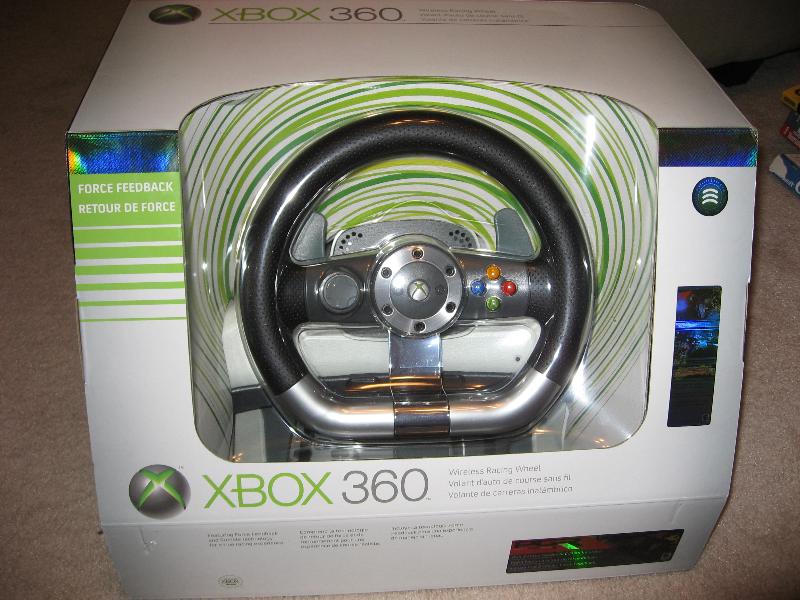
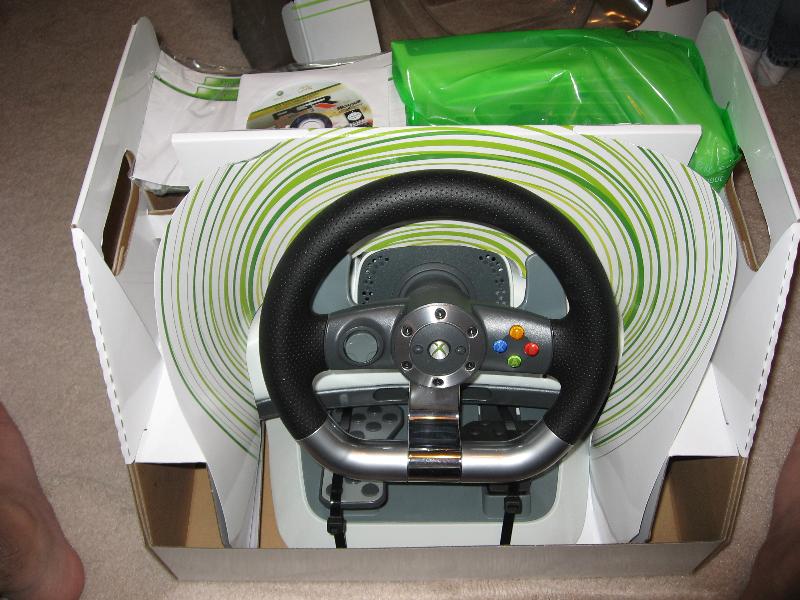


- $150 at best buy
- Getting the thing out of the box was like a puzzle (getting it back in was even harder).
- Wireless to the console. Still requires power from an outlet for force feedback. You can still use it with only rumble support on the 2XAA batteries (standard xbox 360 controller battery pack).
- Should work with the PC once the wireless PC adapter comes out.
- The pedals are well thought out including a place for your heel to keep it in place.
- Pedals are connected to the wheel with a single cable that looks like a standard phone cable (RJ11)
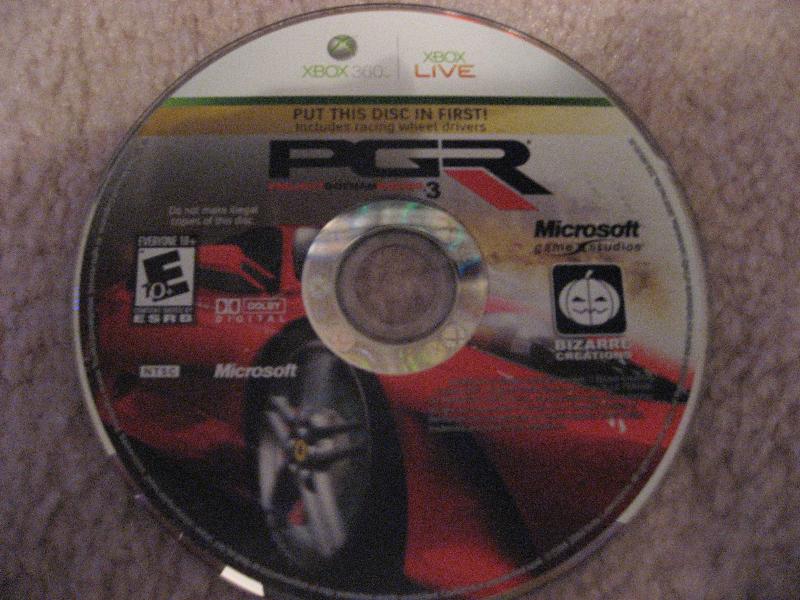
- Comes with the full version of Project Gotham Racing 3 which also contains the drivers. It reads your existing profile/save game if you already have the original PGR 3.
- Wheel is a bit light. Also the curved lap mount doesn't extend far enough. Mad catz had a last gen wheel (no force feedback) that had retractable wings that extended for a very solid lap mount. You can push your legs outward with a slight bit of pressure to keep the wheel steady in your lap. It was a pretty good design. In contrast the MS wheel just kind of sits on your lap and doesn't wrap around your legs far enough.
- I didn't bother trying the table mount. It only has a single bolt in the center. Compare this to the Logitech MOMO Racing wheel for the pc which uses two bolts.
- Force feedback effects felt pretty good in PGR 3 if a bit subtle for my tastes. I've already played this game to death so I didn't mess with it much.
- I've just started playing NFS Carbon which is fully supported by the wheel. The force effects are even more subtle here. The rumble effects are very pronounced (read exaggerated). The steering sensitivity seems way too high and the dead zone a bit too small. Too bad there is NO way to adjust any of this. I tried to get use to the wheel for several races but finally gave up. I went back to the game pad and did MUCH better. I played NFS most wanted on the PC with the MOMO and it was a MUCH better experience with the MOMO with much better force effects.
- Bottom line is I can't recommend this wheel at this time. At a $150 it's too expensive. It's too light, and the wings are too short for laptop use. The force effects are too subtle. NFS Carbon support is pretty poor. PGR 3 was more impressive IF you are still playing that game. I get better force effects and customization with the MOMO on the pc for as low as $50 when on sale. Overall, I think Logitech just makes better wheels. I'll probably wait until July when Logitech releases their wheel for the x360 (Logitech DriveFX) (UPDATE: seems the drivefx is released and after closer inspection it only has rumble feature (no real force feedback). That's an instant deal killer and definitely not worth $100)
Back to the store it goes.
Friday, November 24, 2006
Pelican The Cooler (X360)


- $20 at gamestop
- slight redesign of the fan stand. I like this one better since it doesn't have the useless "wings" for storing stuff taking up space.
- draws power from USB so no chance of burning out your power plug like some reports I read about the Nyko Intercooler.
- It's much quieter than the Nyko but tests show it cools a bit less.
- It has a usb pass through so you don't lose the usb plug on the back. I have the hd-dvd drive piggy backed on the cooler plug, and it works just fine.
- There is a blue led power on/off button on the front. You have to manually turn it on/off since the usb ports are powered (used for charging controllers) even when the x360 is off. That is the only draw back I see so far.
Highly recommended and safer than the Nyko Intercooler if a bit inconvenient.
nice review of both coolers:
http://www.hardocp.com/article.html?art=MTA5MiwxLCxobmV3cw==
UPDATE: 12/6/06
I took my pelican cooler one step further. I added a separate powered usb hub to power the pelican fan so it's no longer even connected to my x360. On top of that I added an X10 appliance module in front of the AC adapter for the usb hub. Then I have an IR -> X10 command module. Then, I programmed this all into my "play x360" activity on my harmony remote. Now when I hit that activity it turns on everything including the pelican fan (and also off when I shut everything off). Yes, I'm THAT lazy!


 English to Chinese BETA
 English to French
 English to German
 English to Italian
 English to Japanese BETA
 English to Korean BETA
 English to Russian BETA
 English to Spanish