These are some early impressions of the game. I'll be updating this post as I get further in the game.
- I played a couple of hours single player(about 4 missions including the training one)
- wow, really nice graphics, the level of detail is simply amazing, good explosions with really good sound.
- Pretty steep learning curve but a very well designed, intuitive, consistent interface. Read the manual since not everything is covered in the training mission. After about 1 hour you'll get the hang of things.
- Great dense urban setting. Lots of action and shooting combined with some tactical aspects like deploying your squad like in the Brothers in Arms games but doesn't require the strict suppressive fire/flank structure. You also get to deploy unmanned drones to scout out the area. Besides commanding your squad at certain times you can control vehicles (tanks, helicopters) in a similar fashion giving them orders to attack, move to a specific position, or rally at your location. Nothing quite like sending in an apache to destroy armor and infantry when you are up against overwhelming odds.
- Best hud yet with lots of info. You can toggle on/off the colored outlines on people.
- default view is 3rd person over the shoulder. You can also switch to first person view (but no gun model). 3rd person works just fine.
- You can't just run and gun. Cover is your friend. One of the best cover/hug wall/popup/look around corner/shoot systems yet. You can go prone.
- Seamless mission structure. All the missions are connected and you usually get moved around by helicopter speaking of which....
- you get to kill hordes of baddies using the side mounted mini gun on the helicopter.
- continue points within the levels so if you die you don't have to completely start over. So far it hasn't been frustrating.
- amazing draw distance that goes on forever.
- stick with the default gun. I tried using the one with the grenade launcher and then realized you lose the scope on that gun. You only get to change weapons every so often at certain rally points.
- the aiming seems to be pretty forgiving.
- from what I've read it seems that this version of GRAW is different than all the other versions (including the pc). so basically it's an x360 exclusive.
- it's the best of tom clancy games + brothers in arms + full spectrum warrior all rolled into one.
Yeah I'm really enjoying this so far. Next Gen gaming has really arrived. Go buy it!
I was able to grab it a day early from best buy for only $48 by price matching against the wed fry's ad.
GRAW XBOX vs GRAW X360
ok I've got to briefly try GRAW on regular xbox (about 30-45min still on mission 1). Here are some impressions
- main objectives, story, and general environments are similar but everything else is different. This is a completely different game from the x360.
- pretty impressive graphics for the old xbox. 480p wide screen support. Very good draw distance but a pretty drastic detail reduction. The cityscape from the chopper definitely looks current gen, good current gen but current gen none the less.
- the hud is similar but looses a few things. first the cross com pip shows more of a slide show of what the other person is seeing instead of the nice smooth real time with cool effects that the x360 gets. Also, instead of the color outline on the targets you get just a colored diamond on the center of the targets.
- initial load times are very long but once in the mission it streams most of the data.
- in mission save points and check points
- In a lot of ways the xbox ver plays a lot more like a traditional shooter. Many of the tactical game play elements have been removed. There is more strict mission scripting and less options to the player. The game is still fun but in a more shallow way. In many respects the xbox graw feels like what you would expect from a console shooter and the x360 graw is more what you would normally find as a PC offering.
- No hide/cover mechanic. Instead you get the usual lean controls. They also added a sprint command. No going prone, only crouch.
- You only get 1 additional squad member to control. You get 3 on the x360.
- You don't get to actually control the UAV. You just deploy it to fulfill a scripted requirement and to give context to why you know where the enemies are on your hud. On the x360 you got to control the UAV location and adjust it's altitude. You fly it low for brief periods to scan the area for enemies but then it's susceptible to fire.
- The map is 2d and you can't really do anything else with it. On the x360 you can position and direct all your assets (squad, tanks, helo's) on the 3d map.
- 1st person (with the usual gun models) vs 3rd person
- when scoped on the x360 you have to hold your breath to steady your aim. Not needed on the xbox (at least with the first weapon you start with).
- no variable distance grenade toss. On x360 you have a visible meter to gauge how far to toss a grenade.
I think it's a fun game and probably worth playing but it's no where near as ground breaking in game play and graphics as the x360 version.
UPDATE (3/13/06) FINISHED single player on normal (X360)
- play time 8h 31mn 49s, score 17180, command grade A+, brotherhood grade A+, aim 15%, headshots 117, neutralized enemies 491, destroyed vehicles 37, wounds 52, healed 26, casualties by support 295, lost support elements 0, lost teammates 0, distance moved 28695.56 meter = 17.8 miles, average speed 1.45m/s
- there's one level (counter sniping) that was a bit frustrating (almost as bad as MOHAA and sometimes worse because of the checkpoint save system). At least that section is pretty short.
- when commanding armor, the tanks are on rails. You can only move them forward, back, stop and shoot. You can direct them to a specific point on the map. Everything else you command you can just have them move to a specific point on the map.
- always stick to the default weapon load out they suggest. It switches to the best weapon to use for each weapon so by them time you finish the game you've pretty much tried them all.
- You can heal your buddies (or have them heal each other) an infinite number of times (they also seem to have infinite ammo). You only get healed at specific checkpoints/mission end. Once a buddy goes down (grey box status) you have a set amount of time to patch him up (back to red status). During grey status the time is fixed no matter how much more he gets hit. If you take too long eventually he will die and you'll just have to do without him until you get a replacement (usually at end of mission).
- Fire! Fire! Once you start something on fire (usually by blowing it up) it stays on fire and creates some nice dynamic lighting and shadows.
- I really like the mostly urban settings and the focus on infantry combat and small squad tactics instead of vehicles like in some of the more recent games.
There is really good mission variety that puts you in all sorts of different roles, there are even a few surprises in the helicopter missions. I only got a bit frustrated on one sub mission. The rest seemed pretty fair. The last mission wasn't too bad (don't take position in the obvious spot, try other areas). The ending wasn't too bad but the story for the most part is forgettable.
Overall, a great single player experience.
Now, on to multiplayer!
Multiplayer
- about 3 hrs of play
- developed by a different team. Controls are the same and in general graphically it looks about the same. Not quite as nice as the single player.
- The whole cover/pop out mechanic is gone.
- tried a game of ctf that was fun.
- Co-op campaign is a blast and is something really special. There's nothing quite like 8 players (up to 16) all on one side going after an objective based mission using voice comms and controlling the UAC to help each other out. The missions are tough with just hordes of baddies!
- Games were very stable and pretty much lag free.
Friday, March 10, 2006
Ghost Recon Advance Warfighter (X360)


Thursday, March 02, 2006
Black (XBOX)
- gun porn. Shooting a gun has never felt so good. The shotgun has to be seen. Every weapon (even the pistol) feels like a serious weapon. Some of the most satisfying gunplay in any game.
- controls are haloish and are spot on.
- sfx really make the weapons sound beefy.
- amazing graphics for the original xbox, probably some of the best I've seen (including halo). 480p and widescreen support. Lots of explosions. Everything explodes. Explosions are amazing. I shot an rpg into a second story window with 2 bad guys expecting a little fireball and killing mabye one of them (they were spread pretty far apart). Instead it set two floors completely on fire, shattered all the glass, and flung the bodies out. If that doesn't put a smile on your face then I don't know what will.
- framerate is great, no slow down.
- checkpoint save system. so far no frustrations. Normal difficuly isn't too hard.
- Level design and variety of environments so far have been pretty good.
- interesting depth of field effect when you reload your gun. The background goes out of focus as if you are looking at your gun.
- Gameplay is pretty standard fps fair but the action and battles are just awesome. AI doesn't seem too bad. I was flanked a few times. You can use stealth in certain parts of the game, shoot out lights, etc but it's more fun to just blow everything up.
- the muzzle flashes are huge combined with the reload/focus thing did make me a bit motion sick after a few hours.
- finished it on normal. shows only 30% game competition (must be the other 2 difficulty settings).
- 7:50:34; 224 head shots; fav weapon: spas 12; enemy count 1,512; total bullets fired, 19,553
- can we say these are the best explosions in any game I've played. The smoke trails on the rpg's are amazing too.
- docks were pretty tough with a good mix between sniper hunting and all out m249 suppression against the attacking hordes.
- The sound is really great. You hear that rpg shriek you WILL START running and find cover. Same goes for the crack of a sniper rifle.
- Finding the RPG guys aren't too bad because of the smoke trails. The snipers are a bit tougher but you can take a few hits so it's no where near the frustration of say MOH AA. Save those rpg's/sniper rounds to counter rpg/snipe. Don't go wasting their valuable ammo.
- You can only carry a max of 2 weapons which kind of sucks. Many times I really wanted 3. Typically I would carry either a smg/assault rifle, and something with a bit more stopping power like a shotgun or magnum. Switch to single fire and you can pick off enemies at a distance.
- most things are destructible (at least the items that make sense). This adds a bit to the gun fights as you hide behind a crate that gets shredded by m249 fire.
- head shots are tough to pull off (a lot tougher than most games). I seemed to have better luck with a silenced mp5. If you don't get a head shot then it takes many hits to bring down a baddie especially those armored shotgun guys. Grenades are your friend.
- plentiful ammo. You will rarely run out. you can hold up to 500 rounds and clips are about double real world size (ak47 has a 60 round clip).
- overall I never got frustrated with the checkpoints. I probably only died around 3-4 times. Difficulty felt about right. There are a few points in the game with non stop enemy re spawns until you figure out what to do (usually blow up a bunker or something, use rpg or a couple of grenades). The last fight was a bit tough. I finished it and I'm not even entirely sure what happened. See next point:
- Smoke, good looking smoke, lots of smoke. Add to that the splinter cell lighting which looks great at first and the reload blur effect (which gets a bit old after a while), it really makes it hard sometimes to see what the hell is going on.
- the boy needs to work on his throwing arm. He tosses grenades like a girl. If you are expecting counter strike toss distances you will be disappointed.
- AI isn't too bad. Not near the fear or even far cry levels but they usually aren't totally stupid. Fire a shot and miss or hit a buddy and they will start running, taking cover, and advancing.
- no multiplayer. single player only.
- good variety of environments but I love the urban settings.
- reproduces many of you favorite movie gun battles like matrix, the rock, etc. Ahh the bridge level and your first taste of the m16 with m203 is just awesome. Every gun is just so much fun to shoot.
- hmmm no blood at all.
- 2 types of health packs, one heals you immediately, the other you can store in your inventory up to 3 max to use when you want. On hard you don't get any of the latter health packs.
- no jump but the level design is pretty good so you don't miss it much.
- The levels are huge both in scale and length (up to about 1 hour). Good streaming tech.
- not enough music. I don't remember my action movies being this "silent"
- pretty bad abrupt ending with not much explanation of anything and sets it up for a sequel.
If you like FPS you owe it to yourself to check this game out. The moment you pick up the controller you know you are playing something special.
Short but very very sweet. Go pick it up or at least rent it. It's a definite must finish type of game.

Friday, February 24, 2006
Fight Night Round 3 (XBOX 360)
- $48 at frys
- I created my own boxer (the options are pretty extensive. almost like creating a rpg character) and started career mode. I've won two fights so far and completed a training session before each fight which helps boost your stats. The manual is pretty skimpy and you pretty much have to figure out what to do in the training mini games all by yourself.
- I tried the original xbox FNR3 (at least it supports 480p wide screen) and compared it against the x360 version. Yeah there is no comparison in the graphics department. Gameplay wise if you leave the HUD on it's pretty close I'll have to admit. Yeah I'm a graphics whore. I'll pay more for pretty pictures.
- One of the big selling points on the x360 is that you are suppose to leave the hud off and just use graphic cues to determine the state of your boxer and your opponent which is how a real boxer does it. Ummm it's a game. I like hud's. At least it's a simple option you can toggle.
- ring girls.
- I've read talks about intrusive advertising but so far I've haven't noticed ANY advertising graphics or audio. Maybe it's because I'm such a lowly fighter right now and don't have any "sponsors" yet?
- When you get knocked out you have a little mini game to get back up.
- I really enjoyed the demo and this full version doesn't disappoint. I've never played any of the other FN's before so the right analog stick for punches feels really innovative.
The demo is a pretty good representation of what you will get in the full version. I loved the demo so I really like the full version. Give it a try and see if it's your type of game.
Highly recommended.

Saturday, February 18, 2006
AV Switches
Joytech AV Control Center 240C
- $90 at best buy. Hard to find now. Mostly sold out.
- 6 component (7th input on the front is composite/svideo only)
- 4 optical
- remote with descrete IR codes for each input
- custom LCD display (5 chars max). Label each input anything you want.
- Backlight turns on briefly only when turning on the unit or switching inputs.
- Picture does NOT jump/roll during bright contrast scenes.
- Quality looks good for the most part with ONE exception. On an xbox over component 480p if you use the optical audio hookup it for some unkown reasons generates an "interference" like pattern that is only really visible on black or really dark scenes when sitting close. If you unplug the optical cable then it immediately clears up and the picture looks fine. This is consistent across all 4 inputs that have optical. Of course the other 2 component inputs look fine since they don't have optical inputs. I've tried two different units from two best buys and they both behave exactly the same so this issue is systemic.
- I've read reports of rolling/screen jitter during very bright scenes. This seems to only happen with CRT's. I never experienced this since I'm using a LCD flat panel.
vs
Score(Pelican) Universal System Selector Pro 2.0
- $100 at gamestop ($80 at frys)
- 5 component (6th input on the front is composite/svideo only)
- 3 optical
- remote with descrete IR codes for each input
- LCD desplay only lets you toggle between preset labels. You can't write your own.
- Backlight is on all the time.
- Picture does NOT jump/roll during bright contrast scenes.
- Quality looks very good on input one. But on inputs 2-5 there were various problems. Several inputs showed lots of wavey lines, one looked completely purple. I exchanged it for another unit (from a different gamestop even). This time different inputs were broken and exhibited similar problems. Input 1 was always perfect but at least 2-3 of the other inputs were really really bad. It seems there is a major build quailty issue. I ended up returning it.
If you can find a working unit the Score isn't too bad for the money. Right now I'm learning to live with the Joytech. The distortion really isn't noticeable during gameplay. Besides I really need the 4 way optical switch with remote. The cheapest I found that is for $90 so think of the video switching as a bonus.
What I'm really waiting for is this joytech switch:
4 way component, 4 way optical, with remote, $99 retail
http://www.joytech.net/5/products/xbox360/4/106/Control-Center-540C.htm
It's suppose to be out in a couple of months. I hope it fixes the optical interference issue.
UPDATE: It seems to be out now:
http://www.walmart.com/catalog/product.do?product_id=4244402
Additional info:
http://www.keohi.com/keohihdtv/interfaces/switches.html
http://www.avsforum.com/avs-vb/showthread.php?t=612573&page=1&pp=30
http://www.tivocommunity.com/tivo-vb/archive/index.php/t-168748.html
4 way optical switch with remote:
http://www.hometheaterhifi.com/volume_10_4/sound-professionals-toslink-optical-switcher-10-2003.html (not sold anymore?)
http://www.inday.com/da4x/da4x.htm ($120)
http://www.partsexpress.com/pe/showdetl.cfm?&DID=7&Partnumber=180-980 (3 way manual)
cheap way to combine two optical (as long as both devices aren't on at the same time)
http://www.monoprice.com/products/product.asp?c_id=104&cp_id=10401&cs_id=1040108&p_id=966&seq=1&format=2&style=
bandwidth:
http://www.hometheaterforum.com/htforum/showthread.php?postid=1221843#post1221843
THE top of the line (and the most expensive):
http://www.zektor.com/
http://www.inday.com/
http://www.inday.com/reviews/rgb4x-review.htm
Other higher priced tier options:
https://www.audioauthority.com/indexh.php
http://www.video-storm.com/categories.asp
4 way component only switch
http://www.monoprice.com/products/product.asp?c_id=101&cp_id=10112&cs_id=1011201&p_id=3027&seq=1&format=2&style=
4 port HDMI switch
http://www.monoprice.com/products/product.asp?c_id=101&cp_id=10106&cs_id=1010602&p_id=2721&seq=1&format=2&style=
5 port HDMI switch
http://www.monoprice.com/products/product.asp?c_id=101&cp_id=10110&cs_id=1011002&p_id=2777&seq=1&format=2&style=
another hdmi/video only switch:
http://www.markertek.com/Product.asp?cat=ROUTERS&subcat=&prodClass=HDMISWITCH&search=0&off=0&baseItem=HDMI%2DSW1 - thanks curtis104
3 way component/optical with remote
http://www.uniqueproductsonline.com/coviandtosww.html $65 + 11 shipping (never heard of these guys: http://www.resellerratings.com/seller10284.html)
http://www.avtoolbox.com/avt5831.shtml
http://www.cablestogo.com/product.asp?cat%5Fid=3103&sku=40324
http://www.impactacoustics.com/product.asp?cat_id=1002&sku=40324 (review) - thanks 13th shadow
http://www.showmecables.com/viewItem.asp?idProduct=4371
UPDATE 4/9/06
A new switch: Psyclone Source Selector PSC01 just showed up at Best Buy for $100. It's a 4 way component all with optical. My friend just got one so I should have more info soon. He says the quality is great. No loss in picture quality. The only drawback, and it's a pretty big one, no discrete remote IR codes. You only get up/down select buttons.
UPDATE: 11/26/06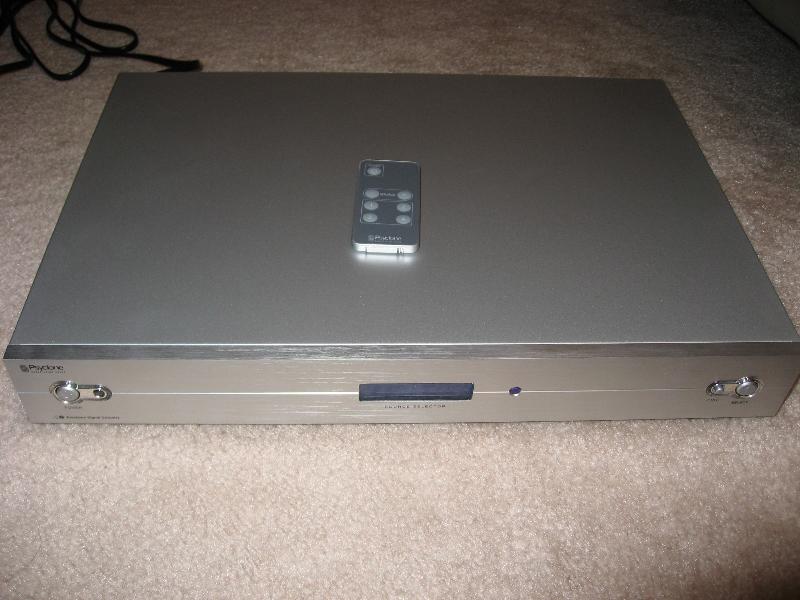

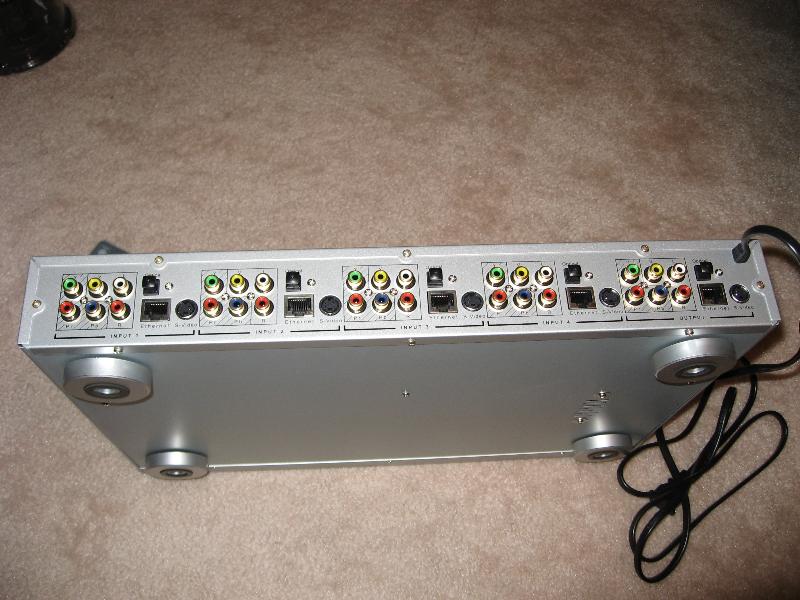
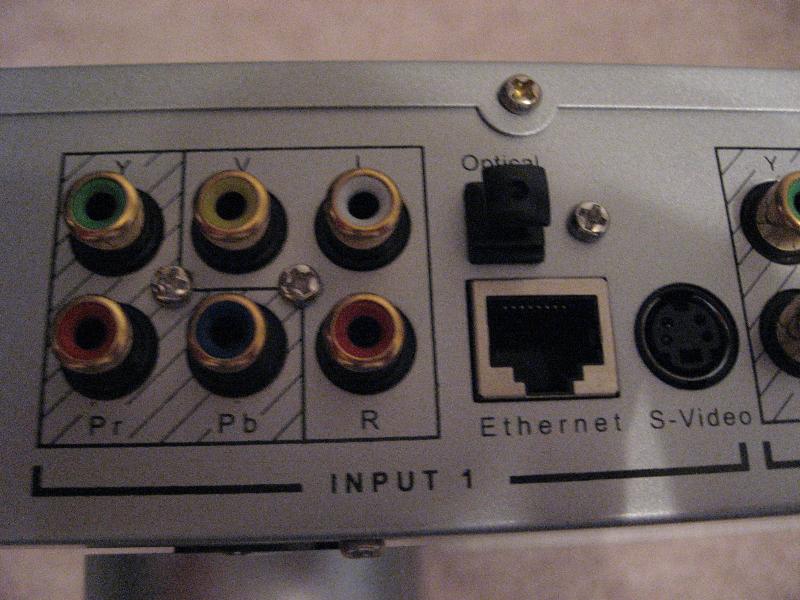
- Psyclone PSC01 Component Switch with the new 7 button advance remote
- $105 at best buy
- You can't tell by the box if it has the new remote. Just open the box (it's not sealed) and the remote should be taped to the center of the switch. Just look for the extra buttons.
- I tested all 4 ports with X360 over component 720p with optical 5.1 sound. It all worked perfectly with excellent video quality across all 4 ports. Quality is better than the Joytech 240c.
- The new remote is great with discreet input selection.
- Switching is smooth and pop free.
- I didn't test the ethernet since I have a dedicated 16 port ethernet switch I'm already using.
- 4 sets of inputs each with component, composite, s-video, and optical. 1 set of outputs.
- LCD display which you can customize. It seems to stay lit (and it's pretty bright) all the time unlike the joytech which fades to black after a few seconds.
This is hands down my new favorite near $100 switch with great functionality, quality, and value.
UPDATE 12/17/07
- I reviewed the Monoprice 5X1 HDMI switch (REV 2.1) at the end of this post:
http://blog.arogan.com/2007/10/home-theater-upgrade.html


Tuesday, February 14, 2006
Microsoft Windows Media Center Edition 2005 (with XBOX 360)
rollup 2
latest version of MCE
Basically I wanted to give MCE a try and to record HDTV and display it on my new TV using the xbox 360 as a media extender.
MCE forums:
http://www.thegreenbutton.com/
- hardware: athlon xp oc to 2.4ghz, abit nf7-s 2.0 latest bios, ati radeon 9700 pro, 1 gig of ram, 300gb hd, 250gb hd, win pvr 150, fusionhdtv5 gold.
- based off of winxp pro sp2
- looks and feels like regular windows. The MCE application doesn't even launch on startup by default. You should be able to run most xp programs without issue
- rollup 2 is an optional windows update and you get it just like any other windows update. Make sure you check windows update AFTER rollup 2 since there is another patch to rollup 2.
- when installing video drivers make sure you d/l the MCE specific drivers!
- installed the latest win pvr 150 drivers from:
http://www.shspvr.com/smf/
- the win pvr mpeg2 drivers are NOT MCE compliant. You will need to install a compliant encoder. I installed powerdvd 6 which worked fine. You might not even have to do this if you get the fusion. The fusion has it's on very high quality MCE mpeg2 decoder which uses many acceleration features of your video card (DxVA - directx video acceleration). This is important when playing back HDTV streams. Use this utility to pick the decoder to use:
http://www.microsoft.com/downloads/details.aspx?FamilyID=DE1491AC-0AB6-4990-943D-627E6ADE9FCB&displaylang=en
- installed the fusion drivers before adding the card as per instructions. Grab the latest beta from:
http://www.fusionhdtv.co.kr/ENG/Download/Software.aspx
I bought the fusion at:
http://store.snapstream.com/tvtunercards-hdtv.html
I still think the lite is a better value at $99 but I got the gold since I wanted to test everything.
The free philips antenna you get is a zenith silver sensor clone (also available at microcenter for $30) which is known to be one of the best indoor antennas you can get.
I also considered the myHD 130
http://www.mitinc.co.kr/mitinc/e_site/index_new.jsp
but since there is almost no 3rd party support (no mce, beyondtv, or sagetv) I skipped it. Plus it's $200.
- the gui is very pretty. Overall they got quite a few things right but there are some pretty serious limitations IMO.
- 1 recording path. You can only specify a single directory to store your TV recordings.
- 2 tuner limit unless you registry hack. (i hear with rollup2 it's now 2 analog + 2 digital tuners).
- requires an analog tuner WITH hardware mpeg2 encoding. This is why hybrid digital analog tuners (like my fusion gold and ati all in wonder cards) won't work without an additional compliant analog tuner card (like the pvr 150). I hear there are hacked ati drivers that work with mixed results.
- Guide data comes from zap2it.com. It's very good data. 13 days.
- rich data for cover art and show/movie descriptions.
- records in a proprietary container file format (wraps mpeg2) called dvr-ms. Also, it supports the ugly D word (DRM) and bloats the file size. Check out dvrms toolbox
http://www.thegreenbutton.com/community/shwmessage.aspx?ForumID=26&MessageID=113435
- good 30 sec skip forward, 5 sec skip back for getting around commercials.
- NO clear QAM support (yet). Only option for HDTV recording is atsc OTA. The way it works is when scheduling a season through the guide you will see each episode listed twice (one with the analog channel number and one with the digital channel number). Digital channel numbers are generated by adding 1000. So channel 2.1 would be 1021. Channel 13.1 would be 1131. Just make sure you schedule the right episode on the right channel and you are good to go.
- go to http://www.antennaweb.org to find out which direction you should point your antenna. I get pretty good reception on everything except fox and abc are a bit low (4 yellow bars instead of green). I'm thinking about adding a preamp. These are suppose to be the best:
Channel Master 7777
http://www.warrenelectronics.com/antennas/7777.htm
- S3 standby/suspend.
http://www.thegreenbutton.com/community/shwmessage.aspx?ForumID=50&MessageID=89473
Set your bios to S3 insteald of S1. This is a neat feature that lets you suspend to ram (everything is off, fans, lights, etc and only power is given to the ram) and then it wakes up to record your shows then goes back to sleep. I'm still testing but this mostly works with a few issues. Media extender won't wake up the pc unless you turn on wakeup on PCI. If I do this, once you wake it up it will never go back to sleep. Once you wake up, the network adapter seems a little laggy. When using MCX (media center extender) key presses seem unresponsive. If you disable/enable the network adapter then everything works fine again. I'm working on an automatic process to restart the network adapter. I've got a batch file calling devcon that works great:
http://support.microsoft.com/default.aspx?scid=kb;EN-US;Q311272
I also have some sample c# code that captures the resume event so I can launch it.
- UPDATE: I found a fix for my network s3 standby issues:
Go into device manager, properties of your network card, power tab, uncheck "allow computer to power down this device" or something like that. That seemed to fix it for me.
- and another gotcha with s3
Read the last post
- check out MCE power toys including tweakmce
http://www.microsoft.com/windowsxp/downloads/powertoys/mcepowertoys.mspx
-drvms file size for 1 hour of hdtv recording: 6GB
xbox 360 integration
- go to the the media center blade. It will give you an 8 digit number. Then you go to your mce and d/l an extender service at xbox.com/pcsetup. You run that and eventually it asks you for the 8 digit number. Now you've effectively paired the two and everything should just work.
- scheduling recordings, watching live tv with guide, pre-recorded shows, music, photos all work great on the x360.
- network shares. This is how you can get network shares to work with MCX WITHOUT enabling guest account:
http://dotchris.net/?p=6
and another explanation:
Read about the 5th response down.
The method works perfectly and now my mcx can browse videos from all 3 machines my homebrew PVR records on, music from another machine, and then photos on my media server.
Unforunately, I don't think the method will work with Windows media connect (music and photos only) since it doesn't seem to create the MCX1 user like the MCE version of extender does.
- You can watch timeshifted HDTV by just entering channel numbers > 1000. It looks and works great.
Fusion HDTV software
- It works. You can watch dtv or analog tv. Full hdtv looks great even on a computer monitor. Timeshifting works fine too. You can choose to record as a transport stream (ts/tp) OR naitive program stream (.mpg)!!! No conversion needed. It's just an option in the config.
- You can manually schedule future recordings or use titantv epg. Schedule data is stored in an unencrypted ACCESS MDB file!!! There is a column in the table that has this long value:
M0015026000320061128232500045200
After some experimenting I decoded it as follows:
M0015 -? always the same
026 channel
0003 - ? always the same
2006 year
11 month
28 day
232500 start hour,min,seconds (24hr time)
045200 duration: hour,min,seconds
I used access and inserted my own row and it immediately appeared in the fusion schedule! I have a very easy integration point now if I can't find a command line recorder.
- This is all ota hdtv. I still need to test clear qam
- captured a HDTV ts and a mpeg using the fusion software and tried to play it back on other machines:
btw both files played back fine using the fusion software on the machine it was recorded.
this was tested on a stock athlon xp 2000 machine with a gf3 (no dxva acceleration)
- mediaMvp thinks the mpg is pal format. I guess that's the generic message for it isn't NTSC resolution compliant!
- playback through media player with the default pvr intervideo mpeg2 decoders - no go. Pretty much freezes after a few frames.
- playback using VLC. ts works but mpeg no sound. I think I might need to install the ac3 directshow filters on this machine. Playback is choppy and cpu is at 100%
- powerdvd 6. both files worked ok with sound but again it was choppy and cpu was at 100%. hw acceleration was checked.
decoding hdtv streams is serious business. Another option I think is getting one of these:
http://www.newegg.com/Product/Product.asp?Item=N82E16814121542
and use these codecs:
http://www.nvidia.com/page/purevideo.html
I hear that can drop cpu utilization by 30-40%.
I still need to do more testing with different decoders.
- I bought both of these:
Channel Master 7777 (highly recommended in avsforum.com)
http://www.warrenelectronics.com/antennas/7777.htm
Motorola Signal Booster
http://www.circuitcity.com/ssm/Motorola-Signal-Booster-484095-001-00-/sem/rpsm/oid/44964/catOid/-12990/rpem/ccd/productDetail.do
(also $50 at microcenter)
about $40 at amazon
Both of these do a really good job with the silver sensor antenna for ATSC OTA. I had two channels that were in the yellow on signal strength. After adding either of these, every channel was maxed out green. I think the channel master is suppose to be better for antenna and the motorola for general purpose (digital cable, broadband cable modem) but either will work very well.



 English to Chinese BETA
 English to French
 English to German
 English to Italian
 English to Japanese BETA
 English to Korean BETA
 English to Russian BETA
  English to Spanish